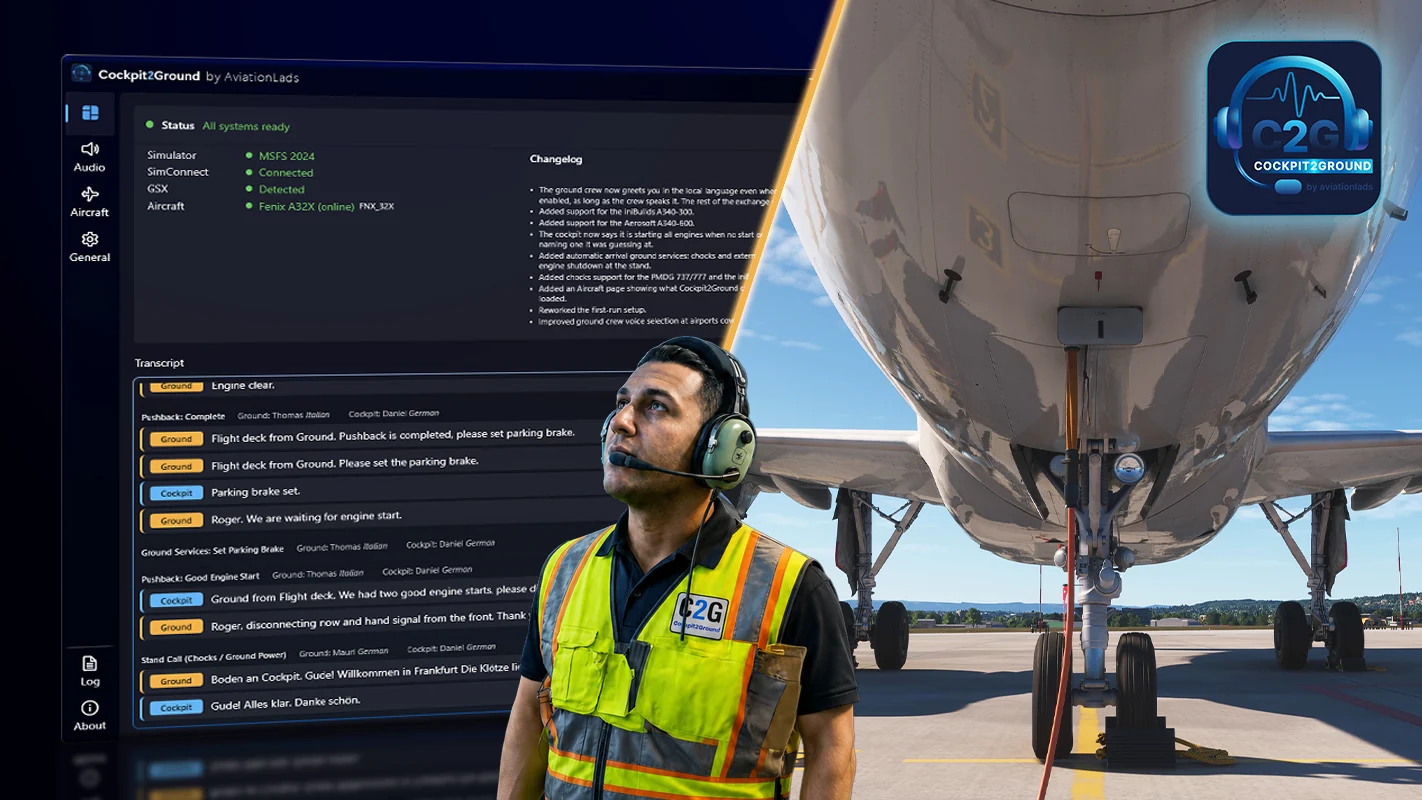


AviationLads, working with LAND3 Simulations, has announced Cockpit2Ground, a new Microsoft Flight Simulator utility designed to replace GSX’s default ground-crew audio with a dynamic communication system that reacts to what is actually happening during the turnaround. The product is listed for Microsoft Flight Simulator 2024, requires FSDreamTeam GSX, and is expected to release through Contrail on September 8.
More Than a Sound Pack
Cockpit2Ground is not simply a collection of replacement voice recordings.
The software reads information from the aircraft, GSX, SimBrief, weather conditions and the simulator environment, then triggers ground-to-cockpit communications based on the actual state of the operation.
That means the dialogue can change depending on things such as:
- Aircraft type
- Engine start sequence
- Pushback tug type
- Weather
- Time of day
- Departure and destination
- Airline
- Ground-service status
The goal is to make pushback and turnaround communications feel less like a fixed sequence of audio clips and more like an actual ground crew following the operation.
Engine Start Logic Follows the Aircraft
One of the more interesting features is aircraft-specific engine start behavior.
Cockpit2Ground can follow different engine-start sequences depending on the aircraft. For example, the system can recognize an Airbus A320-style Engine 1 then Engine 2 sequence or a Boeing 737-style Engine 2 then Engine 1 sequence.
The software also monitors live engine parameters.
Rather than disconnecting the headset immediately after the pilot presses the starter, the ground crew remains connected until the full start sequence is complete and the cockpit confirms a good start.
That should make the sequence feel considerably more natural for pilots who already use GSX for realistic pushback procedures.
Towbar or Towbarless? Cockpit2Ground Knows
The system can also detect what type of pushback tug GSX is using.
If a towbarless tug is selected, Cockpit2Ground recognizes the aircraft-lifting procedure and changes the communication flow accordingly. If a traditional towbar tug is used, the calls adapt to that instead.
That is a small detail, but it is exactly the kind of thing that can make repetitive pushbacks feel less scripted.
The Cockpit Intercom Actually Matters
On supported aircraft, Cockpit2Ground can integrate with the aircraft’s real INT or intercom volume controls.
Turn the intercom volume down in the cockpit and the ground crew gets quieter or disappears entirely. If the crew is trying to reach the pilots and nobody responds, Cockpit2Ground can trigger a cockpit call or attention chime.
The current aircraft profile list includes support for aircraft from developers such as:
- Fenix
- PMDG
- FSLabs
- FlightSim Studio
- TFDi
- Synaptic Simulations
- iniBuilds
- FlyByWire
Support depth varies by aircraft depending on what cockpit variables are exposed, but Cockpit2Ground also includes a generic profile for aircraft without a dedicated setup.
More Than 180 Voices
Cockpit2Ground ships with more than 180 unique voices.
The system includes male and female ground crew voices and can automatically match the voice to the GSX ground-crew avatar.
AviationLads also built the system around regional accents and localized language packs.
At launch, fully localized communication is supported in:
- English
- German
- French
- Dutch
- Italian
- Spanish
- Polish
- Turkish
The system also includes multiple phrase variations for common events so that every pushback does not sound identical.
SimBrief Helps Decide Who Talks to You
Cockpit2Ground uses SimBrief information to determine the airline, departure airport and destination.
That information can influence language, accent and greeting logic.
One example given by the developer is Paris.
An Air France flight at Paris may trigger French ground-crew communications, while a Lufthansa flight at the same airport may use English instead.
Cockpit crew accents can also be matched to the airline being operated.
That gives the system a surprisingly deep sense of location and airline identity.
Pushback Includes Actual Off-Block Time
Once pushback begins, the ground crew can announce the aircraft’s actual off-block time.
Pilots can choose whether that time is reported in UTC or based on the local PC time zone.
The pushback sequence then continues through engine start and final release for taxi.
It is one of those details that airline-operation enthusiasts will probably appreciate far more than someone simply trying to get away from the gate as quickly as possible.
Ground Power Can Disconnect Automatically
Cockpit2Ground can also connect cockpit actions directly to GSX.
If the pilot switches off external power in a supported aircraft, the program can automatically command GSX to disconnect the GPU.
That removes another little break in immersion where the pilot performs the correct cockpit action and then has to open a separate menu to tell the ground crew what should already be obvious.
Arrival ground handling can also include chocks, ground power and confirmation that the aircraft has been secured.
De-Icing Gets a Full Communication Workflow
Cockpit2Ground includes a completely redesigned de-icing and anti-icing communication system.
The software recognizes the fluid type and concentration selected in GSX and can include those details in the communication sequence.
Before releasing the aircraft back to ATC, the ground crew can also report the anti-icing start time.
That should make winter operations considerably more convincing, particularly for users who enjoy operating from airports where January means de-icing is less of an optional extra and more of a lifestyle.
Weather Can Change the Conversation
Weather conditions also influence the system.
Cockpit2Ground can react to rain, snow and slippery surfaces, including adding delays or altered procedures around engine start.
Time of day also changes the available phraseology.
That means a morning departure does not necessarily use the same greetings and sign-offs as a late-night pushback.
Combined with regional voices and multiple phrase variants, that should help prevent the communication system from becoming repetitive after a few flights.
Audio Can Be Tuned
The application includes independent radio-effect controls for both ground and cockpit audio.
Users can choose presets or manually adjust the sound to recreate different types of communication equipment.
Options include:
- Radio static
- Push-to-talk sounds
- Clicks
- Background ambience
- Ground-crew noise
- Different audio-quality profiles
Users can also select a dedicated audio output device.
That could be particularly useful for cockpit builders who want ground communications routed to a headset or separate audio channel.
A Live Transcript Shows the Conversation
Cockpit2Ground includes a live communication transcript showing who said what and when.
The application also provides a status screen showing connections to:
- MSFS 2024
- SimConnect
- GSX
- Active aircraft profile
The interface also includes version and changelog information, automatic updates and an option to start automatically with Microsoft Flight Simulator.
Users can even hide GSX text messages for a cleaner simulator display.
It Works With All Aircraft, but Some Go Deeper
AviationLads says Cockpit2Ground works with all default MSFS aircraft and the vast majority of third-party aircraft supported by GSX.
Aircraft with dedicated profiles receive deeper integration.
For example, the Fenix A32X supports intercom volume control, while the PMDG 737 uses the captain’s FLT selector for ground audio. The Synaptic A220 uses its INT volume knob, and several iniBuilds aircraft use the RMP1 intercom selector.
Some aircraft expose fewer usable variables, so specific functions may not be available everywhere.
The generic profile keeps the communication system functional even when advanced cockpit integration is not possible.
GSX Is Required
Cockpit2Ground is not a standalone ground-handling add-on.
It specifically replaces and enhances the communications side of FSDreamTeam GSX, so GSX must already be legally installed.
The developer also warns users to disable the original GSX audio to avoid hearing both systems at once.
That is probably wise unless your goal is to simulate two ramp agents arguing over who actually owns the headset.
MSFS 2024 Is the Official Platform
Cockpit2Ground is officially designed for Microsoft Flight Simulator 2024 on Windows PC.
The developer says it also works with MSFS 2020, but that compatibility is not officially supported.
An active internet connection is required while using the product.
The application is designed to minimize its impact on simulator performance and can automatically enter an idle state during cruise before waking again after landing.
Multiplayer and Online Flying Are Supported
Cockpit2Ground is a client-side enhancement, so it can be used while flying online or in multiplayer.
That includes pilots operating on networks such as VATSIM while using GSX for their turnaround and pushback operations.
Because the communication system remains local to the individual user, it does not require other pilots or controllers to run the software.
Coming Through Contrail
Contrail currently lists Cockpit2Ground as Available Soon, with version 0.14.2 and an availability date of September 3 shown on the product listing.
The product is priced at approximately $17.77 on the Contrail storefront, with regional taxes potentially affecting the final amount.
The developers plan to continue expanding the software with new voices, languages and aircraft profiles after release.
A Small Part of Airline Flying Gets a Big Upgrade
Ground communication is not the flashiest part of flight simulation.
It does not have the spectacle of a new aircraft, a photorealistic airport or a thunderstorm rolling across the arrival path.
But airline simulation is built from dozens of small procedures.
Headset connected.
Brakes released.
Pushback started.
Engine one turning.
Good start.
Engine two.
Pins removed.
Clear to taxi.
When those communications sound repetitive or disconnected from what the aircraft is actually doing, the illusion takes a hit.
Cockpit2Ground is trying to fix exactly that.
By tying GSX communications to live aircraft states, real engine parameters, local conditions, airline information and actual cockpit controls, AviationLads and LAND3 Simulations are turning one of the most routine parts of an MSFS flight into something far more dynamic.
For GSX users who care about airline procedures, this may be one of those add-ons that seems small until the first flight without it suddenly feels strangely quiet.