
Turn Old Devices into Cockpit Displays
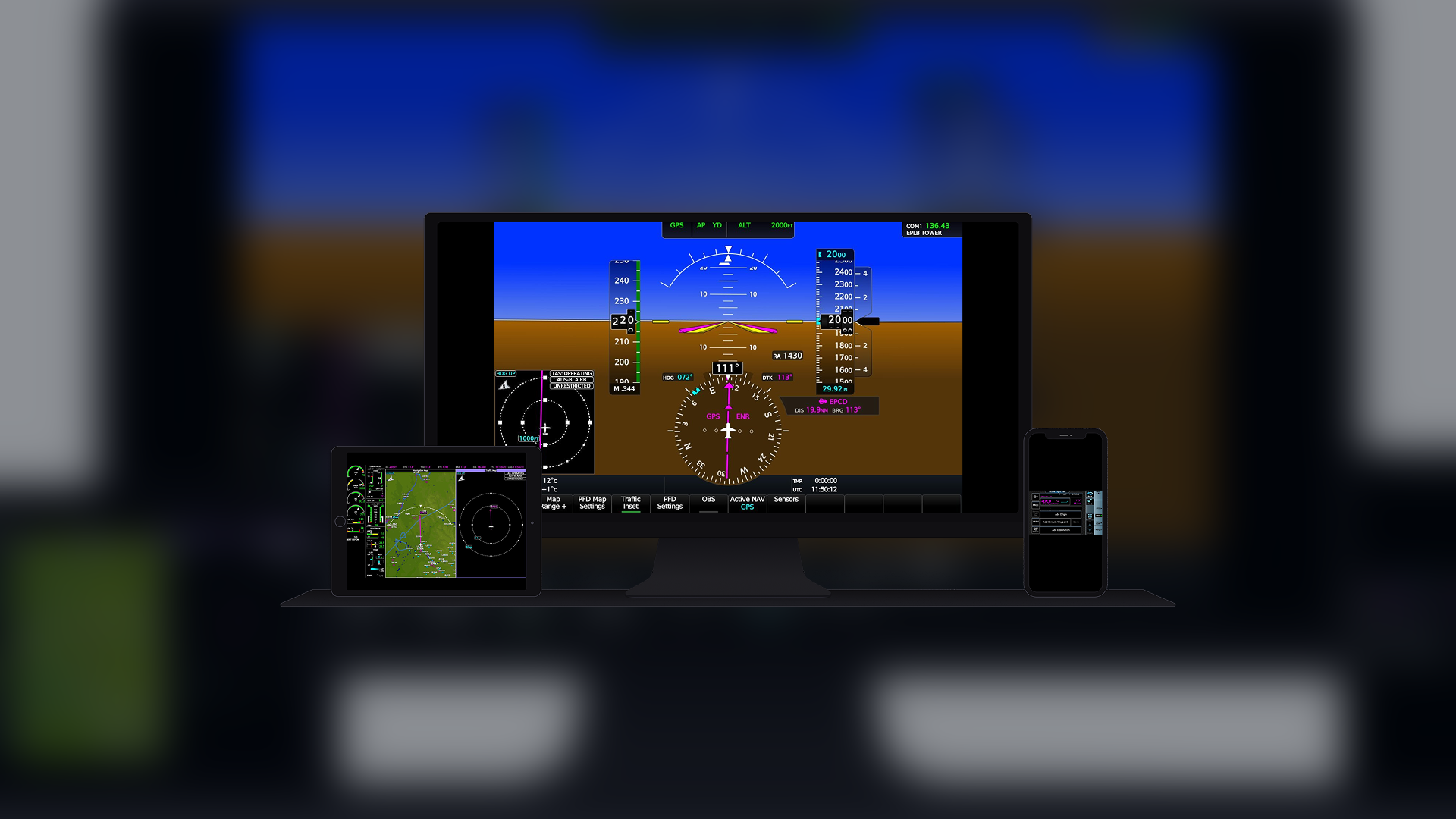
Flight simmers frequently use additional monitors or tablets to display avionics, electronic flight bags and navigation instruments. The process can involve manually opening panels, dragging windows into position and rebuilding the setup every time the simulator starts.
GlassOut approaches the problem differently.
The Windows application captures instrument displays directly from Microsoft Flight Simulator 2020 and Microsoft Flight Simulator 2024 and streams them across the user’s local network. An old tablet, spare phone or secondary computer monitor can become part of the cockpit without requiring a separate simulator installation.
Because the panels remain interactive, pilots can operate compatible touch-sensitive instruments directly from the receiving device. Tapping an EFB, Garmin GTN 750 or G3000 touchscreen on a tablet sends the input back to Microsoft Flight Simulator as an actual cockpit interaction.
Version 1.15 Simplifies Multi-Device Cockpits
The most significant addition in GlassOut 1.15 is the ability to assign individual displays to phones and tablets as part of a saved cockpit profile.
Pilots can create a layout that includes multiple devices and launch the entire setup with one command. Each connected phone, tablet or monitor automatically opens its assigned panel, instrument fragment or custom template.
Closing the profile returns the connected devices to the GlassOut menu. If a required device is not connected when the profile launches, the application warns the pilot before the flight begins.
This could be particularly helpful for more elaborate home cockpits. Instead of launching several programs, opening multiple browser windows and positioning each instrument manually, the complete display arrangement can be deployed from one saved profile.
Mobile Applications Receive Major Improvements
The GlassOut companion applications for iOS and Android have also been updated.
The applications can now remember the connected simulator computer and silently reconnect when opened. Live thumbnails allow pilots to preview available panels before selecting them, while a downward swipe closes a fullscreen instrument without leaving a permanent close button over the display.
Users can also hide empty panels, creating a cleaner interface on smaller screens.
Touch input now passes through a small agent inside Microsoft Flight Simulator. According to the developer, this makes taps, swipes and dragging movements more stable when operating touch-based avionics and EFB applications remotely.
A configurable touch-delay setting is included for pilots who need to adjust responsiveness for a particular device or network.
Custom Templates Gain More Precise Controls
GlassOut can capture complete instrument displays or extract individual gauges from larger textures rendered by the simulator.
The template editor allows pilots to combine those instruments into custom layouts designed for a particular tablet, monitor or home-cockpit panel.
Version 1.15 introduces more accurate positioning and sizing controls. Users can enter exact dimensions, preserve an instrument’s aspect ratio or restore an item to its original proportions.
These additions should make it easier to build symmetrical instrument panels and align displays with physical cockpit bezels.
No Manual Pop-Outs Required
Traditional multi-monitor setups commonly rely on Microsoft Flight Simulator’s panel pop-out function. That process can be time-consuming and may affect simulator performance.
GlassOut captures the panels automatically after the flight loads. The developer says the application reads live DirectX 12 textures rather than using optical character recognition or conventional screen capture.
The utility uses CPU-based JPEG encoding without a video encoder or additional VRAM use. FlyingArt describes the expected performance effect as zero to negligible on a modern system, although results may vary depending on hardware, network conditions, display resolution and the number of connected devices.
GlassOut requires Microsoft Flight Simulator to operate in DirectX 12 mode. DirectX 11 is not supported.
Public Beta Available with Free Demo
GlassOut remains in public beta, meaning users may encounter bugs or unfinished features while development continues.
The application includes a free demonstration mode with access to all major features. Demonstration displays contain a repeating watermark, allowing pilots to test compatibility and performance before purchasing a license.
The full license is currently available for a one-time beta price of $22, compared with the planned regular price of $29. It includes unlimited devices on the user’s home network and updates for the current major version. There is no recurring subscription.
Purchases made during the beta include a 14-day refund period. Because current beta builds are not digitally signed, the developer warns that some antivirus programs may initially flag the installer.
Pilots can download the demo, review documentation or purchase the utility from the official GlassOut website. Companion applications are available through the Apple App Store and Google Play.
For pilots building a home cockpit—or anyone with an old tablet gathering dust—GlassOut 1.15 offers an interesting way to expand the flight deck without filling the desk with additional dedicated hardware.